Push-Pull Pot Power!
A Push-Pull Pot can add a ton of versatility to your guitar! They are a great way to add a switch, or other cool mods without modifying your guitar too much. […]


In terms of guitar wiring modifications, few are as simple and as powerful as the Blender Pot. If you haven’t experienced the Blender Pot’s simplicity and versatility before, my goal with this article is to introduce it, explain how it works, and show you some real-world examples of how to level up your guitar’s wiring to squeeze the most tone out of your guitar. Let’s dig in!
A Blender Pot is basically a gradual switch in the shape of a pot. It’s a knob you can turn on your guitar to get even more tone out of it, achieving tones that a traditional switch cannot get. For example, on a Strat, you can achieve Neck + Bridge tones (like a Tele), and get all three pickups on at the same time.
On a two pickup guitar, it’s like having a “gradual” 3-way switch – giving you the ability to fine-tune the amount of blend you want.
Also, it leaves the rest of your guitar’s functions intact – the 5-way or 3-way switch work exactly the same, it just unlocks additional positions and tones you cannot achieve with a switch alone.
Confused? Check this video out:
In the example above, we’re using the Blender Pot in a Strat with a 5-way switch. When the Bridge is selected, dialing the Blender Pot from 10 to 0 rolls in the Neck position, and vice versa. In either position 2 or 4, you can achieve all three pickups on at the same time.
The Blender Pot combines two concepts:
Technically speaking, the Blender Pot is a no-load pot which connects two pickups through a variable resistor.
On 10, the pot is out of the circuit, and no pickups are affected. Once the pot is rolled back counter-clockwise (from 9 to 0), the pot becomes part of the circuit and the pickups are connected through the resistance of the pot, allowing you to control the amount of blend from each pickup.
Dialing the pot towards 10 adds more resistance until it’s out of the circuit, and dialing towards 0 decreases the resistance between the pickups until they are fully connected. The more resistance (closer to 10), the less blend. The less resistance, the more the pickups are blended.
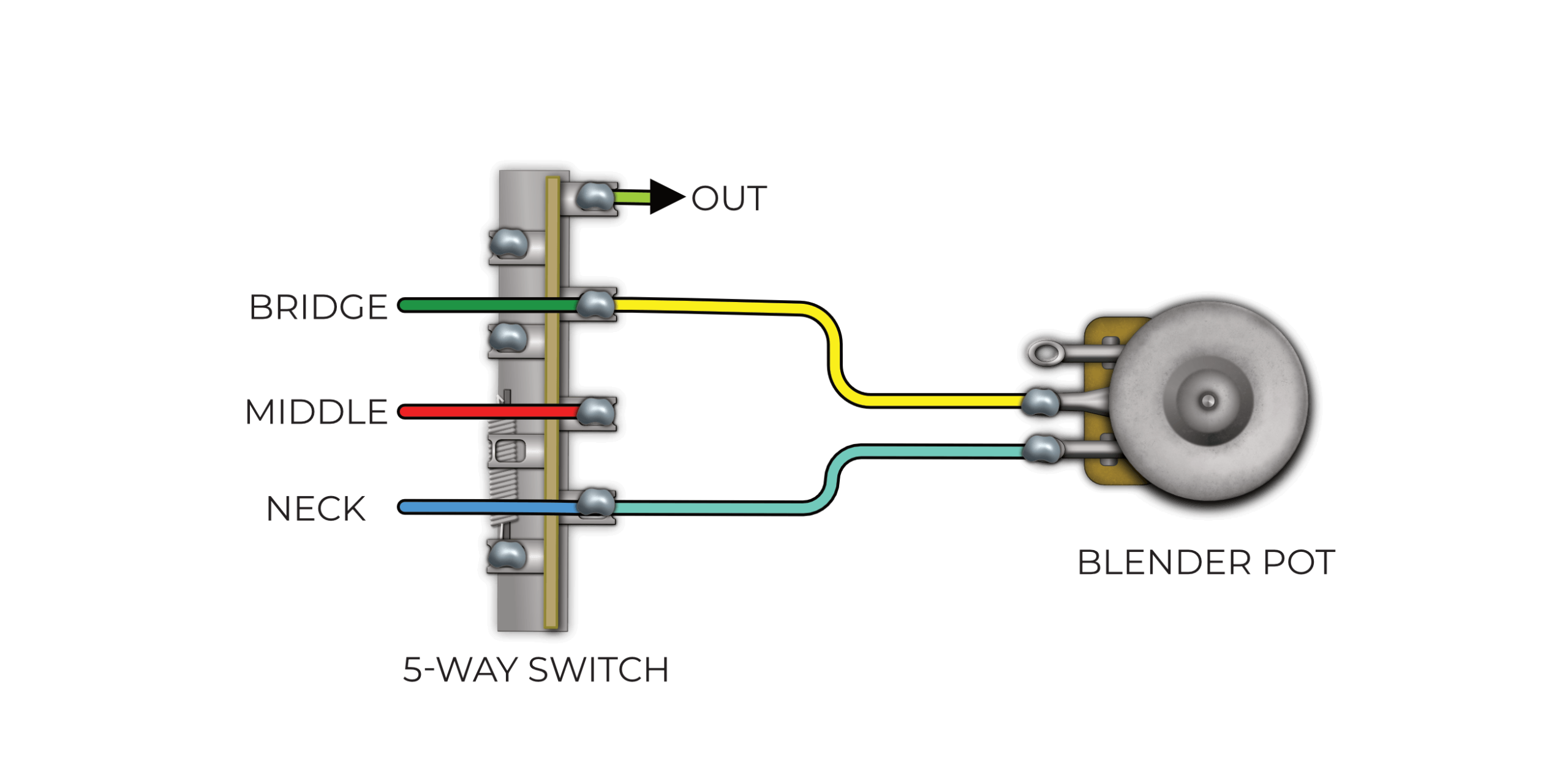
Let’s show a couple basic examples of how we could wire the Blender Pot in a guitar, using a 5 Way and 3 Way Switch:
5-Way Switch
3 Way Switch
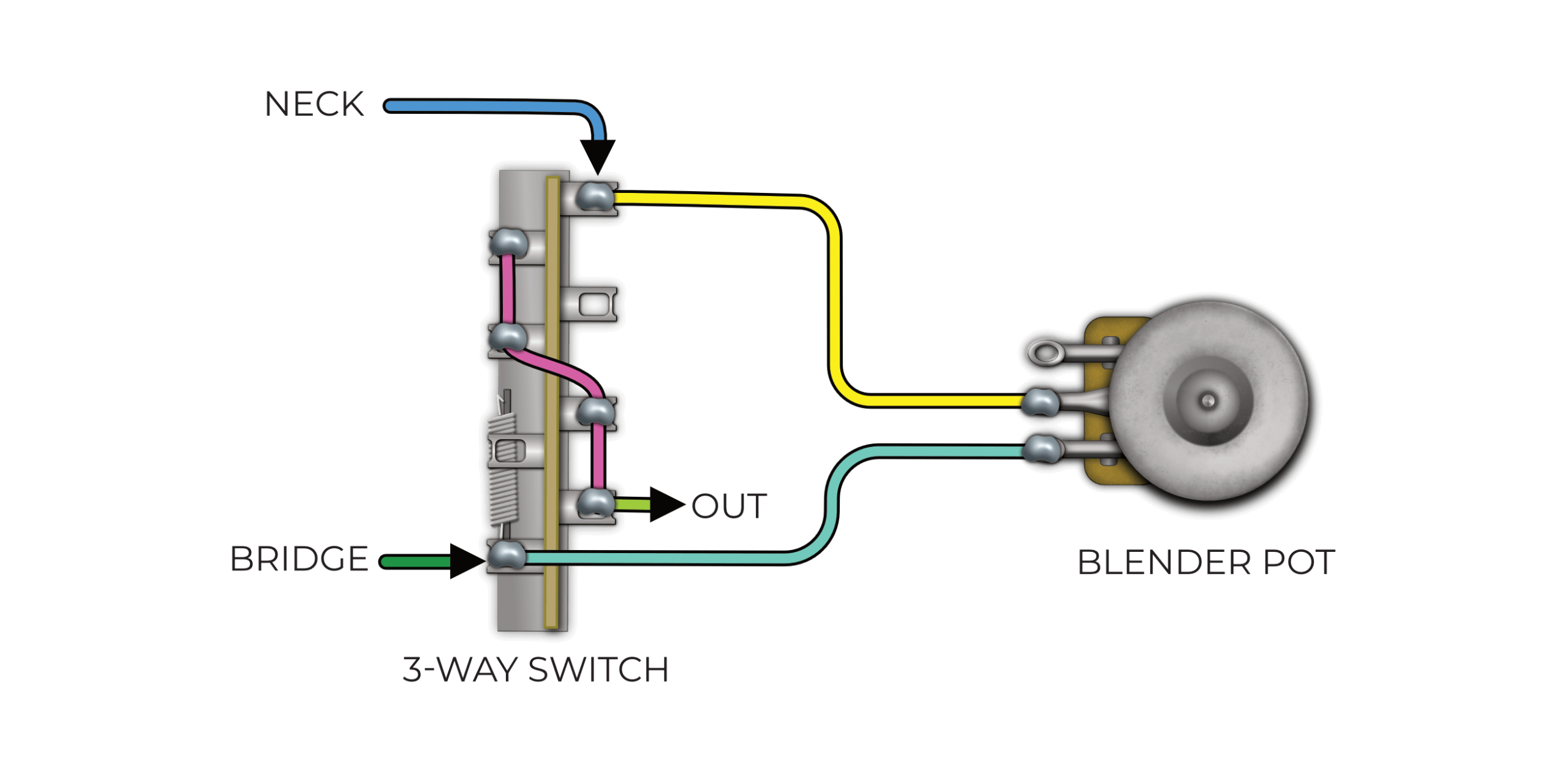
Let’s take a look at the two wiring diagrams above. In the first diagram, we illustrate a standard Blender Pot installation in a Fender Stratocaster with a 5-way blade switch. In the second diagram, we illustrate a Blender Pot being used in a Fender Telecaster with a 3-way blade switch. The concepts are the same, you connect each wire of the Blender Pot to the corresponding pickup terminal on the switch. This can apply to a toggle switch as well!
In both examples, the pot is out of the circuit when it is on 10. It comes in and starts to blend the pickups at 9.
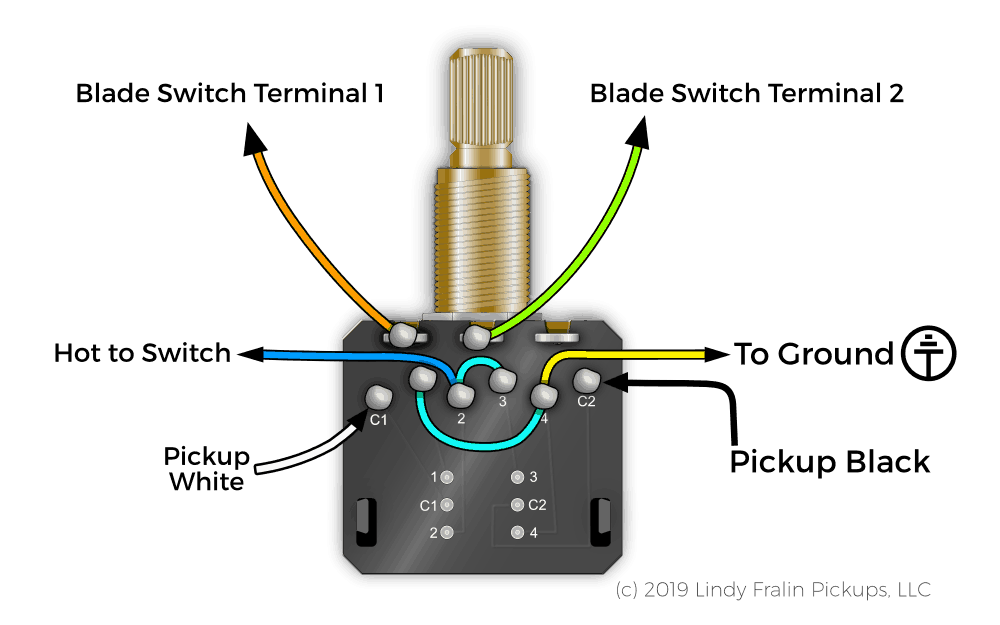
If you need even more flexibility and versatility in your wiring setup, we offer a Push-Pull Blender Pot as well. This pot features the exact same Blender element, just with a CTS® switch on the top of the pot. This is a great mod if you’re combining push-pull pots in your guitar and still want the Blender circuit – for example, if you want 3 push-pulls on a Strat, you can use push-pulls on both Volume and Tone, and the Push-Pull Blender as the Tone 2 pot.
Here are some additional things you can do with the Push-Pull Blender:
This modification allows you to reverse the phase of one pickup, then use the Blender Pot to blend between fully in, and out-of-phase tones! Lindy uses this on a custom Telecaster with 2 P90s. Pulling up on the Push Pull Blender Pot puts the pickups out of phase. Then, using the Blender Pot, you can dial in just the right amount of Phase Reversal – pretty cool!
Since the Blender Pot takes up a Pot position, Telecaster players usually have to sacrifice their Tone Pot in order to get a Blender in the guitar – until now.
The Fralin Blend-Tone Push-Pull Pot is the most versatile Telecaster tone mod yet! Designed by Derek & Luke at the shop, this upgrade gives you the best of both worlds – a traditional tone control and a smooth pickup blender in one convenient pot. Read more about this mod here.
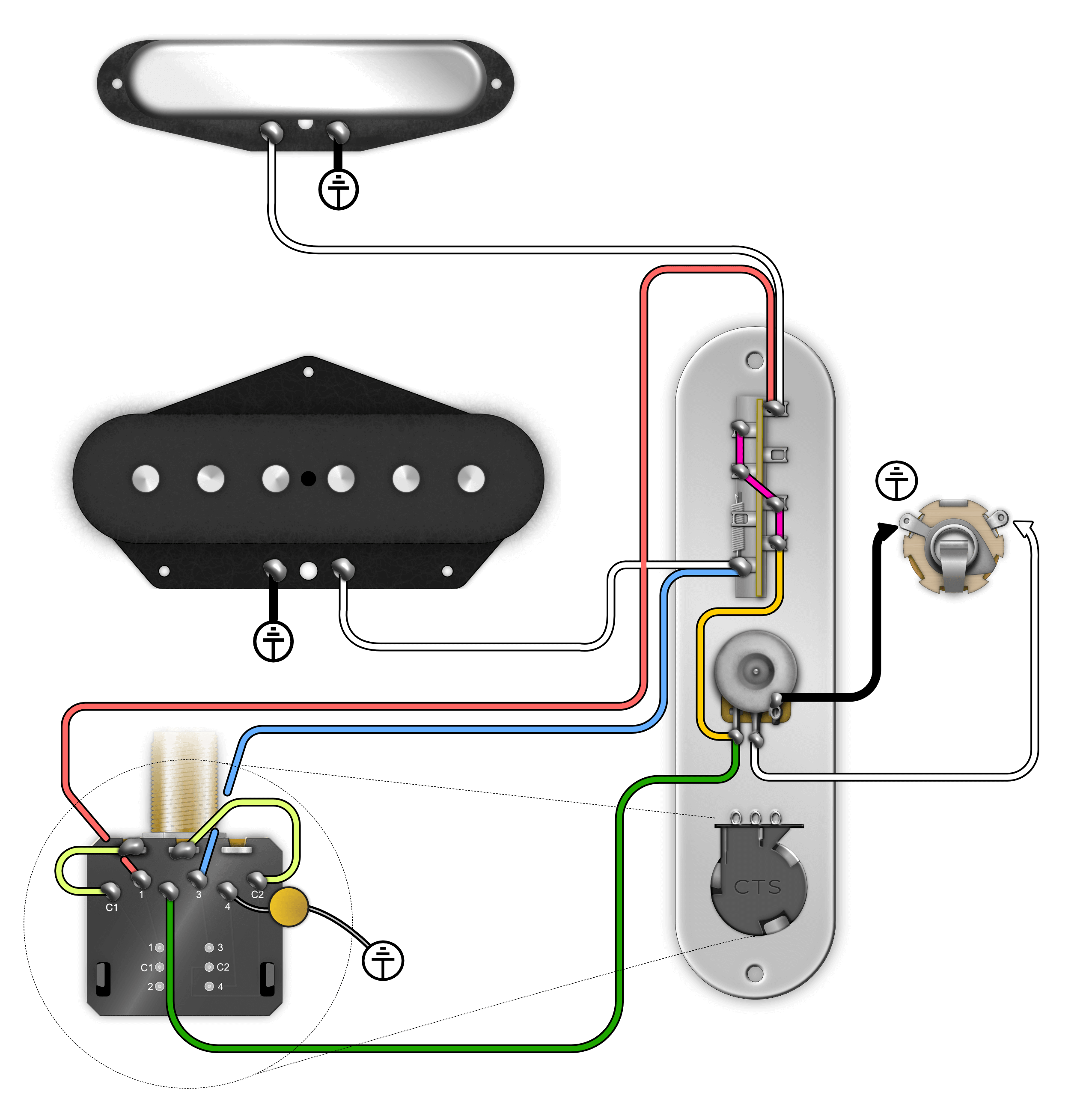
How It Works
• Down Position: Functions as a standard tone control (full brightness to rolled-off treble)
• Up Position: Bypasses the tone cap and becomes a Blender Pot, cross-fading infinitely between bridge and neck pickups
The Blender Pot isn’t limited to just the blend function – it can do a lot more, and it’s a super handy mod to have in your toolbox! Here are some other creative uses for the Blender:
As you can see, this mod is incredibly versatile and unique, and it’s easy to install! It’s a no-brainer for all of us at the shop, and once you get used to it, it’s hard to not have it onboard your guitar. What are your favorite uses for the Blender? Do you have any pickup combinations that work well? Drop them below!